Network Diagram
Current Network Layout
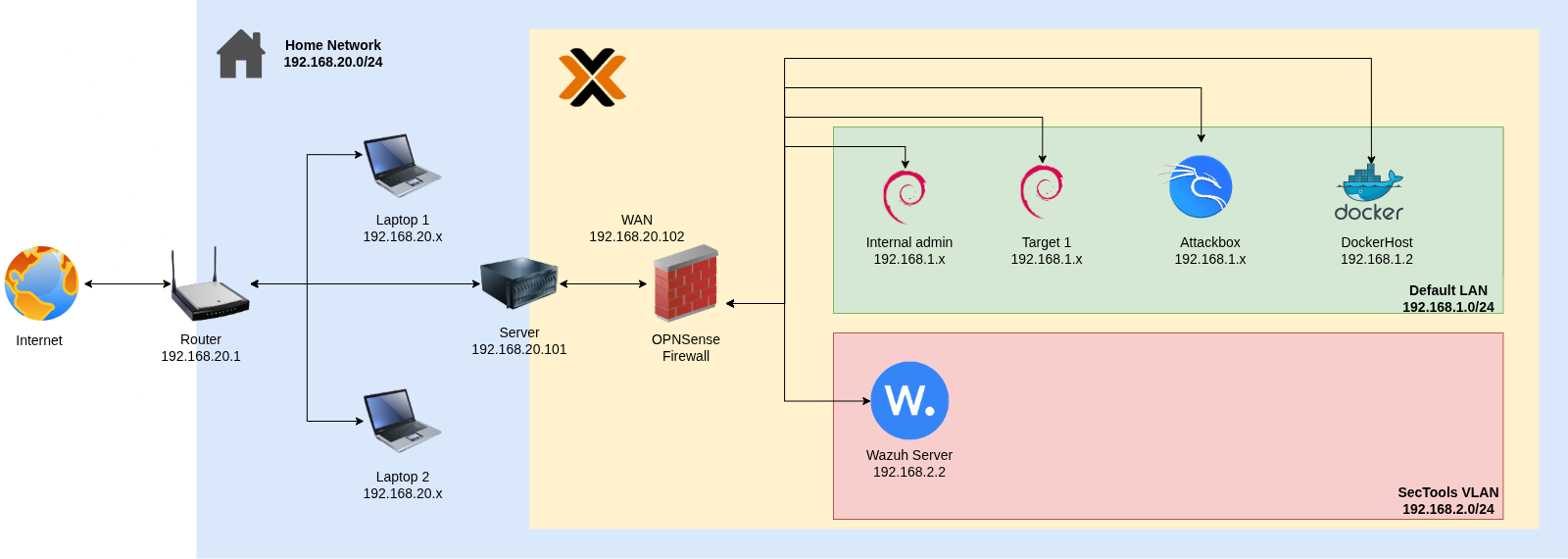
The diagram below reflects the current network configuration of the homelab.
IP Addressing Reference
| Network | Subnet | Purpose |
|---|---|---|
| Home (WAN) | 192.168.1.0/24 | Physical home network; OPNsense WAN |
| LAN | 192.168.3.0/24 | Internal admin network behind OPNsense |
| SecTools (VLAN 2) | 192.168.2.0/24 | Security tools — Wazuh server |
| Targets (VLAN 4) | 192.168.4.0/24 | Vulnerable target machines |
Network Changes
Chapters 1–12 were written using an earlier network configuration. The addressing was updated before Chapter 13.
| Old | New | |
|---|---|---|
| Home (WAN) network | 192.168.20.0/24 | 192.168.1.0/24 |
| OPNsense LAN | 192.168.1.0/24 | 192.168.3.0/24 |
The IP addresses and screenshots shown in Chapters 1–12 reflect the original setup. While the overall network topology remains unchanged, the WAN and LAN subnets were modified, and an additional VLAN was introduced as part of the updated network configuration.